Settings & Customization
Interface and study languages
Set the interface language, the language you speak and the language you study; each one is a separate setting.
What it does
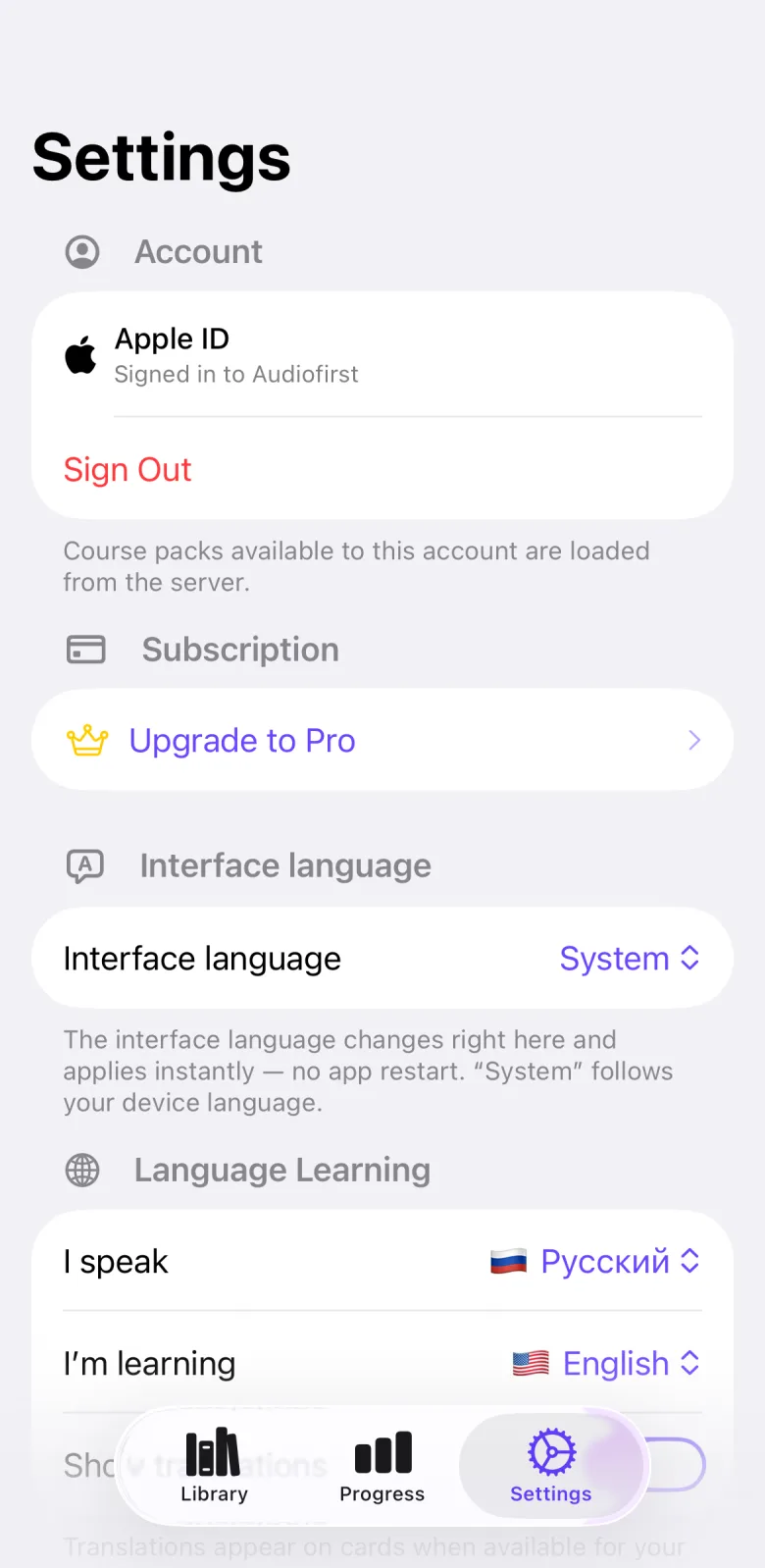
Audiofirst keeps its language choices apart. The interface language sets the text of menus and buttons and changes at once, with no restart. I speak is your native language, used for translations on cards. I’m learning is the language you study. Speech recognition and the voice that reads cards each have their own Language picker.
How to use it
- Open the Settings tab.
- In the Interface language section, pick a language. The app switches immediately. Keep System to follow your device language.
- In Language Learning, set I speak to your native language, or keep Follow phone system.
- Set I’m learning to the language you study.
- Switch Show translations on or off.
- In Speech Recognition, set Language to the language you will speak your answers and commands in.
- In Voice, set Language to the language the app uses to read cards aloud.
Settings that affect it
- Settings → Interface language — default System, which follows the device language.
- Settings → Language Learning → I speak — default Follow phone system.
- Settings → Language Learning → I’m learning — built-in default is American English (en-US).
- Settings → Language Learning → Show translations — on by default.
- Settings → Speech Recognition → Language — built-in default in this version is Russian (ru-RU).
- Settings → Voice → Language — built-in default is American English (en-US).
- The defaults above are built into this version. If you are signed in, our server can send a newer default profile; it only fills in settings you have never changed.
Limits and honest caveats
- The app has 32 interface languages. The interface picker also lists a few regional and script variants, for example English (UK) and Français (Canada).
- The interface language changes the app’s own text. It does not translate the cards; translations on cards are controlled by Show translations and appear only when a card has one for your native language.
- The lists for I speak, I’m learning, Speech Recognition and Voice come from a language list that the app keeps and that our server can update without a new app version, so the choices can change.
- The Speech Recognition list offers only languages that have complete voice commands and that Apple speech recognition supports on your device. The Voice list offers only languages for which your device has a speech voice.
- The study, native, recognition and voice lists show each language with a flag and its own name.
FAQ
How do I change the app language without restarting?
Open Settings, then Interface language, and pick a language. It applies at once. Pick System to follow the language of your device again.
What is the difference between “I speak” and “I’m learning”?
I speak is your native language and is used for translations. I’m learning is the language you study.
Why is my language missing from the Speech Recognition list?
That list shows only languages with complete voice commands that Apple speech recognition supports on your device. A language outside that set is not offered.
Does changing the interface language change my cards?
No. It changes menus and buttons only. Cards keep the language of their pack.